audio technica at lp60xbt manual
Audio-Technica’s AT-LP60XBT offers a user-friendly, fully automatic listening experience, blending modern Bluetooth connectivity with classic vinyl playback capabilities.
Overview of the AT-LP60XBT Turntable
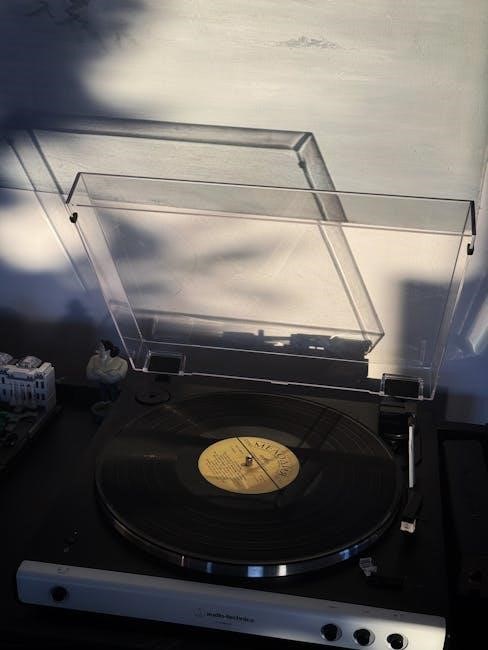
The Audio-Technica AT-LP60XBT is a fully automatic belt-drive turntable designed for both vinyl enthusiasts and newcomers to the world of record listening. It builds upon the popular AT-LP60X, adding Bluetooth wireless connectivity for convenient pairing with speakers and headphones. This turntable features a redesigned two-tone black finish and a simplified setup process, making it exceptionally user-friendly.
Included components typically encompass the turntable body, a felt mat, a platter with a pre-installed drive belt, and an AC power adapter. It’s designed for straightforward operation, offering automatic start, stop, and return functions, ensuring a hassle-free listening experience.
Key Features and Specifications
The AT-LP60XBT boasts Bluetooth wireless streaming to speakers or headphones, alongside traditional RCA output connectivity. It operates at 33⅓, 45, and 78 RPM speeds, accommodating a wide range of vinyl record sizes. The turntable utilizes a pre-mounted cartridge with a replaceable stylus, ensuring ease of maintenance.
Key specifications include a belt-drive system, dynamic balance tonearm with fixed counterweight, and aluminum die-cast platter. Power requirements are typically AC 100-240V, 50/60Hz. Its dimensions are approximately 359.5 x 97.5 x 347 mm, and it weighs around 2.6 kg, making it a compact and portable option.
Setting Up Your AT-LP60XBT
Proper setup involves carefully unpacking all components, ensuring no damage occurred during shipping, and preparing the turntable for initial connection and operation.
Unboxing and Component Check
Upon opening the box, carefully inspect the contents against the included documentation to verify all parts are present. You should find the turntable body itself, a felt platter mat designed to reduce static and protect your vinyl, and the platter with the pre-installed drive belt.
Also, confirm the presence of the AC power adapter necessary for operation. If any items are missing or appear damaged, immediately contact your local Audio-Technica dealer for assistance and potential replacements. A quick visual inspection ensures a smooth setup process and prevents frustration later on.
Connecting the Turntable
Establishing a connection is crucial for enjoying your vinyl collection. Begin with the Power Connection: securely plug the provided AC adapter into the turntable’s power input and then into a working electrical outlet. For Audio Output, you have two options. Utilize the RCA outputs to connect to a stereo receiver or powered speakers for a traditional wired setup.
Alternatively, leverage the built-in Bluetooth functionality for wireless connectivity to compatible speakers or headphones. Ensure proper grounding and shielding to minimize interference and optimize sound quality.
Power Connection
The AT-LP60XBT requires a stable power source for optimal operation. Locate the DC 12V power input on the rear panel of the turntable. Carefully connect the included AC adapter to this input, ensuring a snug fit. Then, plug the adapter into a standard electrical outlet.
Verify the outlet is functioning correctly. Avoid using extension cords or power strips if possible, as they can sometimes introduce noise. A consistent power supply is vital for consistent playback speed and overall performance of your automatic turntable.
Audio Output (RCA & Bluetooth)
The AT-LP60XBT offers versatile audio output options. For a traditional wired connection, use RCA cables (not included) to connect the turntable’s RCA outputs to an amplifier or receiver. Ensure proper grounding to minimize hum. Alternatively, leverage the built-in Bluetooth functionality.
To connect wirelessly, ensure your receiving device is in pairing mode. Then, activate Bluetooth on the turntable. Once paired, enjoy convenient wireless audio transmission. Remember Bluetooth audio quality may vary depending on your receiving device’s capabilities.
Understanding the Controls
The AT-LP60XBT features simple controls for power, speed selection (33/45 RPM), and Bluetooth pairing, ensuring an intuitive and straightforward user experience.
Power and Speed Selection
The AT-LP60XBT’s power button initiates the turntable’s automatic operation. A single rotation controls both power and speed selection; positioning it towards 33 RPM plays LPs, while 45 RPM is for singles. The turntable automatically stops at the end of the record, preventing damage. Ensure the correct speed is selected before placing your vinyl to guarantee optimal audio fidelity. Incorrect speed selection will result in distorted or inaccurate playback. Remember to fully power down the unit when not in use to conserve energy and prolong its lifespan.
Auto-Stop Function
The AT-LP60XBT features a fully automatic auto-stop function, a crucial element for preserving both your vinyl records and the turntable’s stylus. Once the tonearm reaches the end of the record, it automatically lifts and returns to its resting position, halting playback. This prevents continuous looping and potential damage from the stylus dragging along the label. This function operates seamlessly during normal playback, requiring no manual intervention. Confirm the auto-stop is functioning correctly during initial setup for optimal record protection.
Bluetooth Pairing Instructions
To connect your AT-LP60XBT via Bluetooth, first ensure the turntable is powered on. Press and hold the pairing button on the back of the turntable until the Bluetooth indicator light flashes blue. Next, on your Bluetooth-enabled device (speaker, headphones, etc.), initiate a search for available devices. Select “AT-LP60XBT” from the list. If prompted, enter the pairing code “0000”. Once connected, the Bluetooth indicator will illuminate solid blue, signifying a successful pairing. Enjoy wireless audio transmission!
Playing Records
Carefully place your vinyl record onto the platter, ensuring it’s centered. Gently lower the tonearm using the lift lever to begin playback enjoyment.
Placing and Securing a Vinyl Record
Before initiating playback, ensure the AT-LP60XBT is powered on and the felt mat is correctly positioned on the turntable platter. Gently place your vinyl record onto the felt mat, aligning the spindle hole with the center post.
The record should sit flat and secure. Avoid forcing it onto the post. If the record spins freely without wobbling, it’s properly seated. If issues arise, carefully remove and re-center the record.
Always handle records by the edges to prevent fingerprints and damage to the grooves, preserving audio quality and extending the record’s lifespan. Proper placement is crucial for optimal sound reproduction.
Needle and Tonearm Care
Maintaining the stylus (needle) is vital for sound quality and record preservation. Regularly inspect the stylus for wear or debris. Use a stylus brush, gently brushing from back to front, to remove dust. Avoid excessive force or sideways motion.
The tonearm is pre-balanced on the AT-LP60XBT; do not attempt to adjust tracking force or anti-skate settings. Avoid physically impacting the tonearm, as this can damage the delicate components.
When not in use, always keep the protective stylus guard in place to prevent damage; Proper care extends the life of both the stylus and your vinyl collection.
Troubleshooting Common Issues
Addressing typical problems like no sound, Bluetooth pairing difficulties, or skipping records ensures optimal performance of your Audio-Technica AT-LP60XBT turntable.
No Sound Output
If you experience no sound from your Audio-Technica AT-LP60XBT, begin by verifying the power connection to both the turntable and your speakers or amplifier. Ensure the correct input is selected on your receiver. Check the RCA cables connecting the turntable to your audio system; confirm they are securely plugged in at both ends.
If using Bluetooth, confirm the turntable is properly paired with your device and the volume is appropriately adjusted on both. A faulty stylus or cartridge can also cause silence – inspect these components for damage. Finally, test with different records to rule out a problem with the vinyl itself.
Bluetooth Connection Problems
Troubleshooting Bluetooth connectivity on your Audio-Technica AT-LP60XBT starts with ensuring Bluetooth is enabled on both the turntable and your receiving device (speaker, headphones, etc.). Verify the turntable isn’t already connected to another device, as it can only pair with one at a time. Attempt to “forget” or unpair the AT-LP60XBT from your device’s Bluetooth settings and then re-pair it.
Distance and interference can also cause issues; move closer to the turntable and eliminate potential sources of interference. Restarting both devices can often resolve connection glitches.
Skipping or Repeating Sections
If your Audio-Technica AT-LP60XBT is skipping or repeating sections of a record, several factors could be at play. First, ensure the turntable is placed on a level surface to prevent tracking issues. A dirty record is a common cause; clean the vinyl thoroughly with a record cleaning brush and solution; Inspect the stylus for debris or damage – a worn or dirty stylus can’t track properly.
Check for warped records, as these are difficult for any turntable to play correctly. Finally, ensure the tonearm isn’t experiencing external vibrations.
Maintenance and Care
Regular cleaning and stylus replacement are crucial for optimal AT-LP60XBT performance and longevity, preserving your vinyl’s sound quality and the turntable’s lifespan.
Cleaning the Turntable
To maintain your Audio-Technica AT-LP60XBT, regular cleaning is essential. Begin by disconnecting the power. Gently wipe the turntable body and platter with a soft, dry cloth to remove dust. Avoid using liquids directly on the turntable; instead, lightly dampen the cloth with a mild cleaning solution specifically designed for electronics.
The felt mat should be removed periodically and cleaned separately. Carefully lift it off and use a lint roller or a slightly damp cloth to remove any accumulated dust or debris. Ensure the mat is completely dry before placing it back on the platter. Regularly dusting the tonearm and stylus area will also contribute to optimal performance and prevent potential damage.
Replacing the Stylus
The stylus on your Audio-Technica AT-LP60XBT will eventually wear out and require replacement. Carefully disconnect the power before attempting this. Gently remove the cartridge assembly by releasing the two retaining clips on the headshell. Once removed, carefully detach the old stylus from the cartridge – it simply pulls off, but avoid excessive force.
Align the new stylus with the cartridge and firmly press it into place until it clicks. Reinstall the cartridge assembly onto the headshell, securing the retaining clips. Proper stylus replacement ensures optimal sound quality and prevents damage to your vinyl records. Refer to the official manual for detailed diagrams.
AT-LP60XBT Manual Resources
Access the official Audio-Technica AT-LP60XBT PDF manual online for comprehensive guidance, troubleshooting, and support, alongside helpful FAQs and assistance.
Downloading the Official PDF Manual
Obtaining the official PDF manual for your Audio-Technica AT-LP60XBT turntable is straightforward and provides a wealth of information at your fingertips. This digital resource details every aspect of operation, from initial setup and connecting to audio systems, to understanding the various controls and troubleshooting potential issues.
You can typically find the downloadable manual on the Audio-Technica website, specifically within the support section dedicated to the AT-LP60XBT model. Searching online for “Audio-Technica AT-LP60XBT manual PDF” will also yield direct links to the official document, ensuring you have the most accurate and up-to-date information for optimal performance and enjoyment of your turntable.
Accessing Online Support and FAQs
Audio-Technica provides extensive online support resources for the AT-LP60XBT turntable, supplementing the official manual. Their website features a dedicated support section with frequently asked questions (FAQs) addressing common setup, operation, and troubleshooting scenarios. This is a valuable first step for resolving minor issues independently.
Beyond the FAQs, Audio-Technica often offers online knowledge bases, community forums, and direct contact options like email or phone support. These channels allow users to connect with experts and fellow enthusiasts for more personalized assistance, ensuring a smooth and enjoyable vinyl listening experience with your AT-LP60XBT.
Advanced Features & Considerations
The AT-LP60XBT’s cartridge compatibility is limited, and Bluetooth audio quality, while convenient, may not match wired connections for critical listening.
Understanding Cartridge Compatibility
The Audio-Technica AT-LP60XBT utilizes a pre-mounted cartridge, designed for ease of use and setup. While convenient, this limits immediate cartridge swapping options for users desiring different sonic characteristics. The turntable isn’t built for easily changing cartridges like higher-end models.
Replacing the cartridge requires some technical knowledge and isn’t a straightforward process. Attempting to install an incompatible cartridge could damage the tonearm or the turntable’s internal components. It’s crucial to research compatible options thoroughly before considering any upgrades. Stick with Audio-Technica recommended replacements for optimal performance and to avoid potential issues.
Exploring Bluetooth Audio Quality
The AT-LP60XBT’s Bluetooth functionality offers convenient wireless connectivity, but it’s important to understand the inherent limitations of Bluetooth audio transmission. Bluetooth utilizes codecs like SBC, which can result in some audio compression, potentially impacting the fidelity compared to a direct wired connection via RCA cables.
The quality experienced will also depend on the receiving Bluetooth device’s capabilities. Higher-quality Bluetooth codecs aren’t supported. For critical listening, a wired connection is recommended to preserve the full dynamic range and detail of your vinyl records. Bluetooth is best suited for casual listening and convenience.